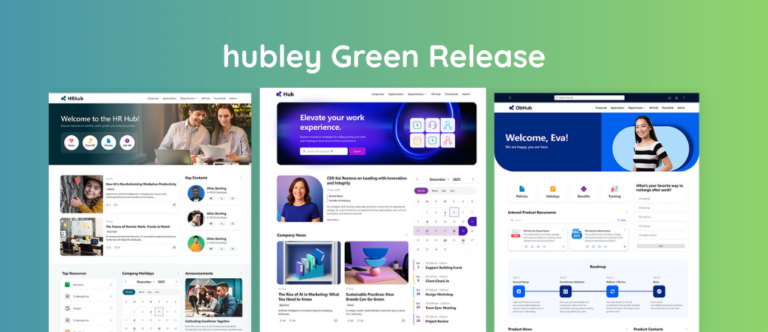
How Intranets Improve Employee Onboarding. New hires decide quickly whether the organization they joined matches the one they were recruited into. Structured onboarding raises retention and shortens time to productive work, yet many companies still run the first weeks through email threads, shared drives, and checklists that live in different systems. A modern SharePoint intranet gives new employees one place for tasks, documents, people, and culture. hubley’s OnboardingHub turns that intranet into a guided, trackable experience that managers and HR can run without rebuilding the process for every cohort.
Why Does New Employee Onboarding Matter?
Onboarding is the process of integrating a new employee into the organization, clarifying the role, and giving them the tools and relationships they need to contribute. Gallup reports that only about 12% of employees strongly agree their organization does a great job of onboarding. That gap sits between the offer letter and the first months of work, which is also when early exits are most expensive.
SHRM has long treated the first 90 days as the window in which a new hire either finds footing or starts looking again. In the SHRM Foundation report Onboarding New Employees: Maximizing Success, Talya Bauer notes that employees get about 90 days to prove themselves, and that the faster a hire feels welcome and prepared, the faster they contribute. Replacement costs routinely run to a large share of salary once recruiting time, lost output, and manager hours are counted.
Gallup also finds that new hires are 3.4 times as likely to call onboarding successful when their manager takes an active role. Process design that leaves the manager out of the loop fails that test even when the paperwork is complete.
How Does a Modern Intranet Support Onboarding?
An intranet is the digital front door. For a new hire it is the place to find the handbook, benefits information, org chart, team sites, required training, and company news. When that content lives inside Microsoft 365 and SharePoint, new employees already have the same sign-in and permissions model they will use every day.
That single front door cuts the volume of “where do I find…” questions that hit HR and managers in the first month. It also gives the organization a consistent way to deliver role-specific content instead of sending every new person the same oversized packet. Earlier hubley writing on this topic is in Building an Intranet That Transforms Employee Onboarding. The same pattern shows up in how an intranet shapes digital employee experience: new hires should not spend weeks learning where each tool lives.
Onboarding is also the first adoption moment for the intranet itself. The 90-day intranet adoption plan treats early, useful first experiences as the reason people come back. If the first tasks a hire completes sit on the same site they will later use for news and policies, the intranet stops feeling like a separate system.
What Are the Four C’s of Onboarding, and Where Does the Intranet Fit?
Bauer’s framework for the SHRM Foundation describes four levels of onboarding. Most programs cover the first and under-deliver on the rest.
An intranet without a task layer can host culture and policy content and still leave the plan untracked. A standalone HR checklist can track tasks and still leave the new hire outside the place where work actually happens. OnboardingHub is the task layer inside the SharePoint intranet, so compliance items, role tasks, and manager visibility sit next to the people and pages the hire will keep using.
What Goes Wrong With Traditional Onboarding?
Many organizations still run onboarding through a mix of email, paper forms, shared folders, and a separate HR system. Common failure points:
- Tasks assigned by email with no single status view for the manager or the new hire
- Documents that exist in multiple versions with no clear current source
- Generic checklists that ignore differences between roles or locations
- Little visibility into which steps are complete and which are stuck
- Managers and mentors who have no simple way to see progress and step in early
- Orientation that ends after week one while the hire is still finding systems and people
Those gaps slow ramp-up and create a poor first impression. New hires hunt for information instead of learning the work. HR chases status. Managers discover missing equipment, access, or introductions at the 30-day check-in. Teams that already use SharePoint Lists for onboarding checklists run into the same visibility problem once the list lives outside a guided employee experience; see how SharePoint Lists support onboarding activities and where a dedicated onboarding layer goes further.
What Is hubley’s OnboardingHub?
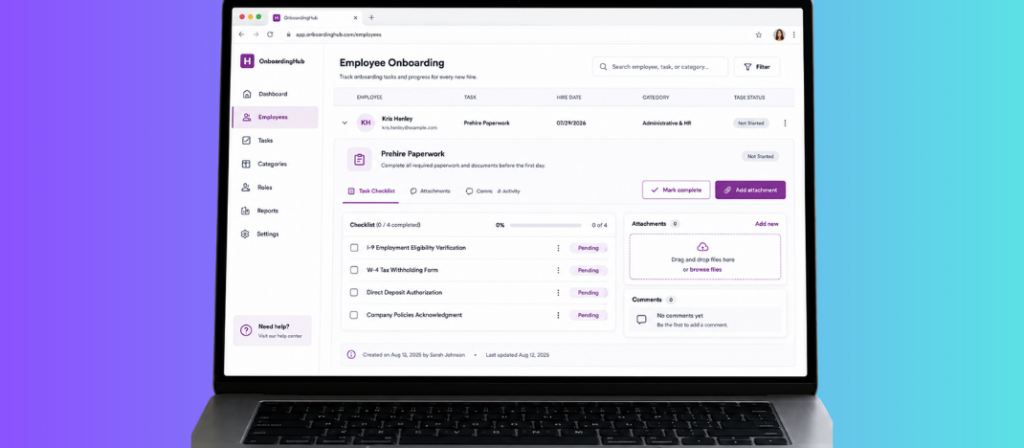
OnboardingHub is hubley’s employee onboarding software built for SharePoint and Microsoft 365. It helps organizations manage new hires, automate task assignments, and deliver experiences by role or job title. The product page frames the job as making every onboarding simple and successful: a smooth start for the hire and a clear operational view for the people who support them.
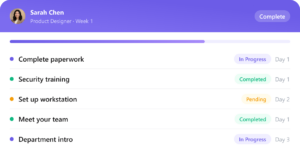
Core capabilities include employee management with role or job-title targeting, task management with automation and due dates, and support for managers and mentors who need to guide and track progress. Real-time status indicators show completed, in-progress, and not-started work so nothing relies on memory or inbox search.
How Does OnboardingHub Streamline the Onboarding Experience?
OnboardingHub is built around three working steps that match how HR and managers actually run a cohort.
Build a complete onboarding plan in one place
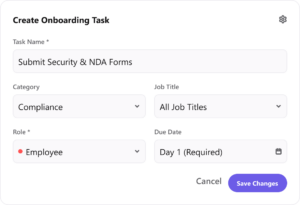
Teams create tasks, attach documents, set order and requirements, and organize work into categories and roles. Templates can be reused so each new hire of a given type starts from the same structure rather than a blank checklist. Required attachments and written instructions sit on the task itself instead of in a follow-up email that gets lost.
Assign the right work automatically
Tasks are targeted by role or job title. New hires receive relevant items at the right time instead of a single undifferentiated list. Bulk import via CSV and email notifications on completion reduce the manual setup that usually lands on HR for every start date.
Track progress and surface milestones
Employees see their own status. Managers and supporting roles see the same data in real time. Status views for completed, in progress, and not started make it obvious where attention is needed. Organizations can mark milestones as they happen instead of discovering gaps weeks later.
Because OnboardingHub lives inside the SharePoint intranet, new hires complete these steps in the same environment where they later find news, policies, people, and tools. Onboarding becomes the first experience of the digital workplace rather than a temporary process that disappears after week two.
Intranet Onboarding vs. Scattered Tools
The difference is operational.
Which Onboarding Best Practices Does an Intranet Make Operational?
SHRM’s practice list in Onboarding New Employees is specific: start before day one, make the first day usable, write the plan down, apply it consistently, monitor it over time, use technology, and check in at 30, 60, 90, and later milestones. An intranet with a dedicated onboarding layer turns those items into work that can be assigned and seen.
- Preboarding happens before the badge works. Tasks and documents can be assigned as soon as the offer is accepted so day one is not a paperwork dump.
- A written 30-60-90 plan becomes a sequenced task template instead of a document that sits unread in a welcome folder.
- Role clarity comes from job-title-based assignment: the right policies, access steps, and learning items for that position.
- Manager and mentor accountability comes from the same status view the hire sees. Gallup’s finding on manager involvement is only useful if the manager can see what is late.
- Culture content lives on the intranet the hire already opens for tasks: news, values, leadership messages, and the new-hire announcement pattern described in Welcome Your New Hire with hubley.
- Policy acknowledgments can sit in the same workplace as the rest of the plan through PolicyHub and the practices in policy management on modern intranets.
HR teams that treat onboarding as part of engagement rather than a one-week orientation will also find the same intranet useful after day 90. That case is covered in how companies use an intranet to increase employee engagement. Design choices that keep the experience usable for new hires are part of building a modern intranet in SharePoint.
Who Benefits From Structured Intranet Onboarding?
New hires receive a clear path, fewer dead ends, and a consistent place to return for answers. That shortens the period of uncertainty that often drives early exits.
Managers and mentors gain visibility into progress and can intervene when tasks stall instead of discovering problems at the 30-day check-in.
HR and people operations standardize the process across locations and roles while still allowing role-specific paths. Completion data is structured rather than scattered across inboxes.
IT and security benefit from consistent access and documentation steps that can be required before certain systems or permissions are granted.
The organization converts recruiting spend into tenure and earlier contribution instead of repeating the same hire six months later.
Turn disjointed onboarding tasks into a guided experience inside SharePoint.
OnboardingHub gives new hires, managers, and HR the same view of progress. Role-based assignment, real-time status, and reusable templates replace email chains and ad-hoc checklists.
Frequently Asked Questions
How does an intranet improve new employee onboarding?
A modern intranet gives new hires one place for tasks, policies, people, and company information. It reduces time spent searching across email and drives, delivers consistent messaging, and creates a natural home for structured onboarding workflows such as those in OnboardingHub.
What is hubley’s OnboardingHub?
OnboardingHub is hubley’s SharePoint-based employee onboarding software. It supports employee management, role- or job-title-based task assignment, automation, real-time progress tracking, and tools for managers and mentors. Details are on the product page at hubley.com/onboarding-hub/.
Can OnboardingHub assign different tasks by role?
Yes. Tasks can be targeted by role or job title so each new hire receives a relevant plan rather than a generic checklist. Categories and templates help standardize the process while preserving role differences.
How do managers track onboarding progress?
OnboardingHub provides real-time status views for completed, in-progress, and not-started work. Managers and supporting roles can see overall progress and individual task status without relying on email updates.
Does OnboardingHub work inside Microsoft 365?
Yes. OnboardingHub is built for SharePoint and Microsoft 365 environments. New hires complete onboarding in the same tenant and permission model they will use for daily work.
How long should employee onboarding last?
SHRM and Gallup treat the first 90 days as the core structured window and the first year as the period when most people reach full contribution. Orientation week is not enough. OnboardingHub supports sequenced tasks across that longer window instead of a one-day checklist.
What are the Four C’s of onboarding?
Talya Bauer’s SHRM Foundation framework names four levels: Compliance, Clarification, Culture, and Connection. An intranet can carry all four. OnboardingHub operationalizes the task side so the plan is tracked rather than hoped for. Read Bauer’s report at SHRM: Onboarding New Employees.
Where can I read more from hubley on intranet onboarding?
Start with OnboardingHub and Building an Intranet That Transforms Employee Onboarding. Related pieces include the 90-day intranet adoption plan, digital employee experience, and the full hubley insights library.
Structured onboarding is one of the highest-leverage investments an organization can make in new talent. When the process lives inside the SharePoint intranet and is driven by role-based tasks, clear status, and manager visibility, new hires spend less time lost and more time contributing. See OnboardingHub or request a walkthrough tailored to how your HR, IT, and hiring managers split the work today.
Sources: Gallup, Essential Ingredients for an Effective Onboarding Program; Gallup, Employee Experience; Talya Bauer, Onboarding New Employees: Maximizing Success (SHRM Foundation); SHRM, Don’t Underestimate the Importance of Good Onboarding; SHRM, Reducing New Employee Turnover.