Introduction
Naming an owner is not the same as keeping a page current. A process page can have a name on it and still describe a workflow the team stopped using six months ago. Employees find it in search. They stop trusting the intranet. They go back to asking a colleague.
Earlier in this series we defined intranet governance and assigned ownership across IT, communications, HR, and department leads. This post covers the habit that keeps that ownership real: review cycles, what gets archived, and how departments stay accountable without a heavy process.
Stale content is a trust problem
SharePoint does not expire a page because the process changed. The page stays searchable. The owner may have moved teams. The version in search becomes the version employees use.
That is how silos reform after a successful launch. Departments keep a private copy of the process because the shared page is wrong. Communications republishes a policy because the original was never reviewed. The horizontal layer still exists. Employees stop using it for anything they have to get right.
What needs a review cycle
Not every page needs the same treatment. News can expire. A homepage banner can come down. The content employees must trust needs a next-review date.
Policies and required acknowledgments. These need an owner, a review date, and a record of who confirmed the current version.
Process and how-to pages. If another department depends on the page, it needs a review cycle. The team that does the work owns the current version.
Org information and shared tools. Org charts, location pages, and links to systems go stale faster than most teams expect. A review date is cheaper than the questions that follow a wrong phone number or a dead link.
Campaign news does not belong on that list. It should have an end date. Leaving last quarter’s campaign on the homepage trains people to ignore the feed.
A review cycle people will actually run
A yearly audit of the whole intranet fails. No one has time for it, and the pages that matter most get the same treatment as pages no one opens.
Set the date when the page is published
A page without a next-review date is a page that will age in public. Policies often need a date within 12 months. Process pages that change with operations may need 6 months. The date is a prompt to the owner, not a promise that the content is wrong.
Review means confirm, update, or archive
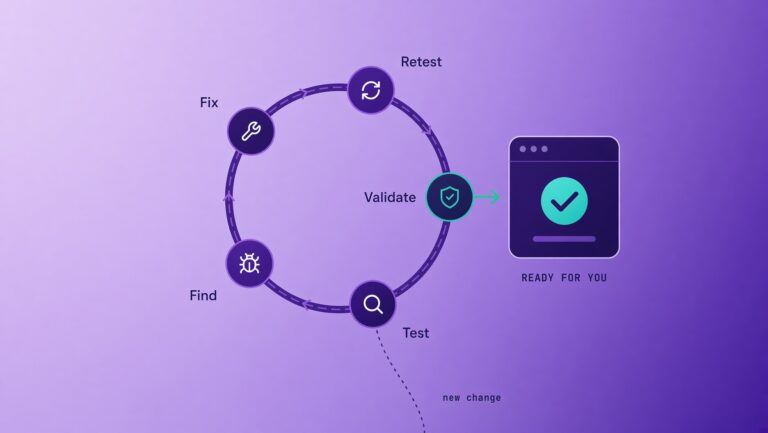
The owner has three outcomes. Confirm the page is still current and set the next date. Update it. Or archive it so it leaves search. Leaving it unmarked is not a fourth option.
Prioritize by risk and use
Start with policies, safety and compliance pages, and the process pages other teams rely on. Analytics can show which pages are opened and ignored. A page that is both high-risk and unused is a review, not a redesign.
The table below is the practical split.
Who is responsible when content is outdated
The named owner is responsible. Not IT, unless IT is the owner of that page. Not communications, unless it is company news. A steering group can escalate a missed review. It cannot rewrite the page.
If the owner has left, the department lead assigns a new name before the next review date. An unowned page is treated as overdue, not as someone else’s problem. That rule is what stops the shared inbox from becoming the owner again.
How often to review
There is no single cadence. Match the date to the risk of being wrong.
Policies and compliance content: at least every 12 months, sooner if the rule changes.
Process pages that other teams use: every 6 to 12 months, or when the process changes.
Org charts, locations, and system links: every 6 months, or when a known change happens.
A shorter cycle on a small set of pages is more useful than a long cycle on everything. Start with the pages employees must get right.
How hubley supports the cycle
hubley is a modern SharePoint intranet platform built natively on Microsoft 365. As a Microsoft Gold Partner, hubley works inside the licenses and security model the organization already owns.
PolicyHub holds the record. Owner, review date, and acknowledgments live with the policy. The current version is the one employees confirm.
AnalyticsHub shows what is used. Review work can start with high-risk pages and pages employees open, instead of a full-site audit.
hubley Green keeps the habit going. Unlimited white-glove support and quarterly feature and design releases mean the review cycle is not a workshop that ends at launch. Most implementations go live in four to eight weeks, with ownership and review included in discovery.
What to do next
List the pages employees must get right. Put a person’s name and a next-review date on each one. If a page has neither, it is overdue. Archive what is no longer true so it leaves search.
If you want to see how a modern SharePoint intranet carries that cycle, schedule a short demo. hubley will walk through PolicyHub, AnalyticsHub, the typical four-to-eight-week implementation, and how hubley Green support keeps review from becoming a one-time cleanup.
Why hubley · hubley Green support
Frequently asked questions
How do you keep intranet content up to date?
Put a named owner and a next-review date on every page employees must trust. On that date the owner confirms, updates, or archives the page. News gets an end date. A full-site yearly audit is not a substitute for that cycle.
How do you prevent stale SharePoint pages?
Do not leave a page in search without an owner and a review date. Archive pages that are no longer true. Use analytics to find unused pages instead of waiting for a complaint. SharePoint will not expire the page for you.
What is an intranet content review cycle?
A review cycle is the date and the outcome attached to owned content. The owner confirms the page is current, updates it, or archives it so it leaves search. Policies, process pages, and org information need a cycle. Campaign news needs an end date.
Who is responsible for outdated intranet policies?
The named owner. For people policies that is usually HR. For a process page it is the department that does the work. IT is responsible only if IT owns that page. If the owner has left, the department lead assigns a new name. An unowned page is overdue.
How often should intranet content be reviewed?
Policies at least every 12 months. Process pages that other teams use every 6 to 12 months, or when the process changes. Org charts, locations, and system links every 6 months. A shorter cycle on a small set of high-risk pages is more useful than a long cycle on everything.