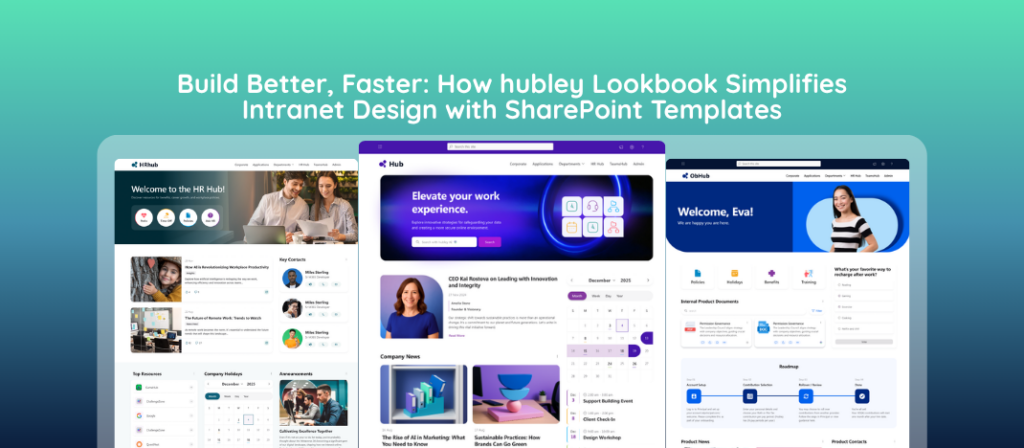
How does hubley LookBook simplify Intranet Design? One of the largest delays in a new SharePoint intranet project is design. Content owners start from blank pages, departments invent their own layouts, and the project timeline stretches while teams debate structure, web parts, and visual standards. hubley Lookbook removes that friction. It is a curated visual catalog of ready-to-use templates for Spaces, Pages, News articles, Apps, and Intelligence patterns. Content owners browse, select a starting layout, and customize it instead of inventing every page from scratch. Organizations reach a usable, consistent intranet sooner, which moves employee value and return on investment forward by weeks or months.
What Is hubley Lookbook and how it delivers SharePoint Templates?
hubley Lookbook is a template library built for modern SharePoint intranets. It presents a visual collection of pre-designed layouts that content owners can preview and apply to Spaces, Pages, News articles, Apps, and Intelligence patterns. The catalog acts as a shared design toolkit rather than a set of locked designs. Teams still adapt content, imagery, and structure to their audience, but they begin from proven patterns instead of empty canvases.
The practical effect is fewer foundational design decisions. Content owners focus on the information employees need instead of spending cycles on layout architecture, web-part selection, and visual hierarchy.
Why Does Design Become the Bottleneck on New SharePoint Intranets?
SharePoint gives organizations powerful page-building tools. Those tools alone do not guarantee speed or consistency. When every department builds independently, the same type of content appears in different structures. One team uses Quick Links and a hero banner; another places the same information in a different order with different web parts. The result is an intranet that feels assembled rather than designed.
These differences slow two critical paths. First, the initial launch takes longer because design decisions must be made repeatedly. Second, ongoing content creation remains slower because new pages continue to start from zero. Over time the experience drifts, adoption suffers, and the organization spends more effort maintaining coherence than delivering information.
A template library does not eliminate flexibility. It removes the repeated decision cost that has no corresponding value for employees.
How Does a SharePoint Template Library Shorten Time to Launch?
When content owners open Lookbook, they see finished layout examples rather than a blank page. The question changes from “What should this page look like?” to “Which of these layouts best fits the content I need to publish?” That shift compresses the design phase.
| Stage | Without Templates | With hubley Lookbook |
|---|---|---|
| Initial page structure | Content owner or designer invents layout, selects web parts, tests spacing | Owner selects a matching template from the catalog and begins with a working structure |
| Cross-department consistency | Each team produces its own pattern; standards must be enforced after the fact | Shared starting points create visual and structural alignment by default |
| Content-owner confidence | Non-designers often wait for specialist help or produce uneven results | Guardrails let more people publish polished pages without deep SharePoint expertise |
| Time to first useful content | Design cycles push the launch date later | Ready layouts move content into production earlier in the project |
The cumulative effect is a shorter path from project kickoff to a living intranet that employees can use. Implementation timelines that once stretched while design debates continued can compress because the heavy design work is already done.
What Templates Does hubley Lookbook Include?
Lookbook covers the core content types and capability patterns most organizations need when standing up or expanding a SharePoint intranet:
- Spaces — departmental, project, and community workspaces that need a consistent home for news, links, documents, and collaboration tools
- Pages — informational and resource pages that present structured content in a clear hierarchy
- News articles — announcement and story layouts that keep corporate communications visually coherent
- Apps — starting points drawn from the hubley app catalog for common solutions such as employee onboarding, policy management, advanced search, and forms building
- Intelligence — real-world use cases for AI and intelligence, including agents, AI Search, document summaries, and advanced analytics
Users browse the catalog, preview the layout, and apply the template to a new or existing site. From that point the page is fully editable inside SharePoint. Branding, images, and copy are adjusted to the organization while the underlying structure remains intact.
How Does Lookbook Keep Consistency Without Removing Flexibility?
Templates supply a common foundation. They do not force every page to look identical. Content owners change columns, swap web parts, update imagery, and rewrite sections to match the specific audience and message. The shared starting point simply ensures that navigation patterns, spacing, and visual language stay recognizable across the intranet.
That balance matters for adoption. Employees learn once how information is presented and can move between department Spaces or news items without relearning the interface. At the same time, teams retain the ability to adapt content to their own needs instead of being locked into a rigid corporate template.
Who Can Request and Apply Lookbook Templates?
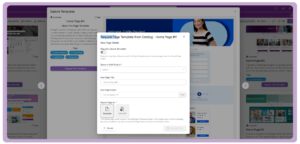
Lookbook is permission-aware. Administrators assign Template Requestors—users whose access aligns with the hubley Spaces Admin role. Anyone who can create Spaces can request templates and apply them to existing sites or pages. Page and News templates follow the normal SharePoint permission model for the target site.
This approach keeps governance in place. The organization controls who can introduce new layouts while still giving content creators the tools they need to build without waiting in a central design queue.
How Does Faster Design Improve ROI on a New Intranet?
Return on an intranet investment begins when employees actually use the system to find information, consume communications, and collaborate. Every week the launch is delayed is a week of delayed value. Design bottlenecks are one of the most common sources of that delay.
Lookbook attacks the delay directly. Content reaches production earlier. More people can contribute without specialized design skills. Visual and structural consistency improves adoption because the experience feels intentional rather than improvised. The combination shortens time-to-value and reduces the ongoing cost of keeping the intranet coherent as it grows.
Organizations that previously relied on a small group of SharePoint specialists or external designers to produce every new page can distribute that work. The specialists focus on more complex requirements while department content owners handle the majority of day-to-day publishing from established templates.
If design cycles and launch timelines are slowing your SharePoint intranet project, start with the template catalog rather than another blank page.
Frequently Asked Questions
What is an intranet template?
An intranet template is a pre-designed layout that gives content owners a finished starting structure for SharePoint Pages, News articles, or Spaces. The template includes web-part placement, spacing, and visual hierarchy so the owner can focus on content instead of foundational design decisions.
Why should organizations use intranet templates on a new SharePoint project?
Templates reduce the time spent inventing layouts, create consistency across departments from day one, and let more people publish polished content without deep design or SharePoint expertise. The result is a shorter path from project start to a usable intranet.
Can hubley Lookbook templates be customized?
Yes. Templates are starting points. Content owners edit layout, replace images, rewrite text, and adjust web parts to fit their specific content and audience while keeping the overall structure intact.
Who can request and apply hubley Lookbook templates?
Administrators assign Template Requestors. Users with permissions to create Spaces can request templates and apply them to existing sites or pages. Page and News templates require the standard SharePoint permissions for the target site.
What types of templates are available in hubley Lookbook?
Lookbook includes templates for Spaces (departmental and project workspaces), Pages (informational and resource pages), News articles, Apps drawn from the hubley app catalog, and Intelligence patterns for AI features such as agents, document summaries, and analytics.
Does using templates force every page to look the same?
No. Templates provide a shared foundation. Content owners customize layout and content for different departments and audiences. The goal is a cohesive employee experience, not identical pages.
How does Lookbook affect overall project ROI?
By compressing design time, Lookbook moves the intranet into production earlier. Employees begin receiving value sooner, adoption benefits from consistent patterns, and ongoing content creation costs less because fewer pages start from a blank canvas.