Why SearchHub Is the Best Search Experience for SharePoint Intranets
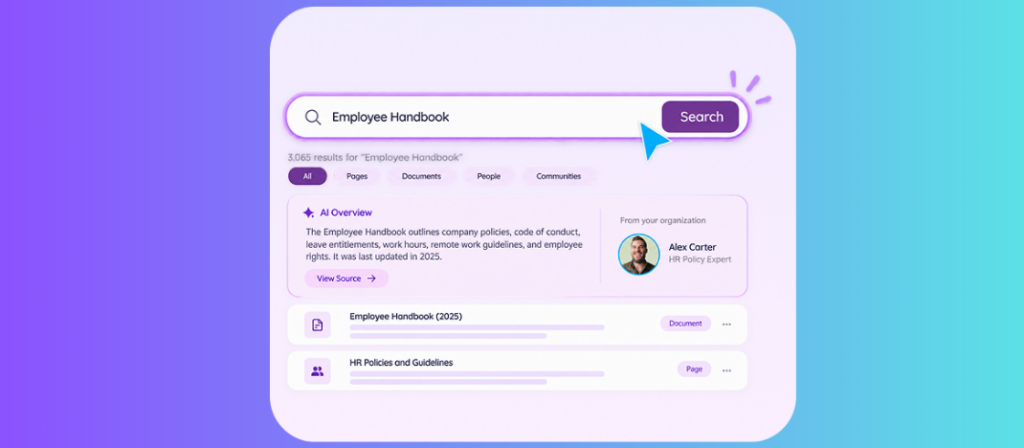
SearchHub gives organizations one search layer across SharePoint, Teams, and OneDrive. If you are looking to enhance SharePoint search in your organization, this solution can help. An employee types a plain-language question and gets an AI overview with visible source citations, a path to the source file, and a next step such as a related FAQ or a contextual chat. Administrators can pin Best Bets, read analytics, and turn individual AI features on or off. Results stay permission-aware. People spend less time hunting and move from a question to a usable answer without opening a stack of tabs.
Why does intranet search fail for most organizations?
Employees look for policies, project files, benefits details, and process steps across SharePoint sites, Teams channels, and OneDrive folders. Native search often returns a long list of links. Relevant content sits behind weak metadata, or it sits inside a long document that no one has time to open. Administrators receive almost no feedback on which queries fail or which results employees actually click. Knowledge that already exists inside the tenant stays hard to find, so people ask a colleague, recreate a document, or stop looking.
The cost shows up as slower onboarding, repeated questions to HR and IT, delayed decisions, and lower confidence that the page found is current. The McKinsey Global Institute estimated that the average interaction worker spends nearly 20 percent of the workweek looking for internal information or tracking down a colleague who has it.
How does SearchHub change the search experience?
SearchHub sits inside the Microsoft 365 tenant as a single search experience that reaches SharePoint, Teams, and OneDrive. A user types a question in everyday language. The system returns an AI overview that summarizes the answer, lists the source documents or pages, and offers a next action such as opening a related FAQ or starting a contextual chat.
The answer, the evidence, and the next step stay in one place. Employees do not need to open ten browser tabs or dig through folders to confirm whether the information is the current version.
| Step | What the employee does |
|---|---|
| Search naturally | Ask in everyday language across SharePoint, Teams, and OneDrive. |
| Read the answer | Review a short AI overview that shows its source references so the result can be checked immediately. |
| Take the next action | Open a related FAQ, review the source document, or ask a follow-up in contextual chat. |
What search management controls does SearchHub give administrators?
Search quality improves only when administrators can see how employees actually search and then act on that data. SearchHub supplies one control panel for this work.
| Control | What administrators can do |
|---|---|
| Analytics dashboard | Track search volume, popular queries, click-through rates, and findability by department. Patterns that were previously invisible become measurable. |
| AI recommendation engine | Surface Best Bet opportunities, flag missing content, and identify popular topics that lack strong results. Recommendation cards include action buttons so an administrator can fix the gap without leaving the panel. |
| Best Bets management | Pin a handbook, the current policy, or the correct process page to specific keywords so it appears at the top of those searches. Content owners and administrators manage the keyword table. |
| AI feature configuration | Enable or disable Overview, Summarization, and smart suggestions with toggle controls. Governance stays with IT rather than becoming a side effect of the AI features. |
Which AI features turn documents into usable answers?
SearchHub adds three AI capabilities that run on the organization’s own files and knowledge bases.
| Feature | What it does |
|---|---|
| Document summaries | Long policy documents, handbooks, and process guides become short summaries with one click. Employees read the essential points without opening the full file. |
| Doc Chat | Users ask questions inside a specific document, clarify a term, or request a translation while staying in that file. The conversation stays grounded in that source. |
| FAQ generation | A messy knowledge base or a long policy PDF converts into a structured FAQ section. SearchHub can also return those answers in search results. |
How does SearchHub keep results secure and permission-aware?
SearchHub follows the access model the organization already uses. A result appears only for content the employee is allowed to see. Hidden knowledge does not become public knowledge.
| Control | How it works |
|---|---|
| Permission-aware results | Every employee sees results aligned to existing Microsoft 365 access. |
| Source-backed AI | Answers keep the original references visible for verification and deeper reading. |
| Microsoft 365 native | Search runs across the SharePoint, Teams, and OneDrive content teams already use. |
| Governed experience | Administrators review analytics and turn individual AI features on or off. |
Who benefits from SearchHub inside the organization?
| Role | What changes |
|---|---|
| IT | Administrators configure directories and search parameters without custom development and monitor query performance from one panel. |
| Content owners | Owners pin Best Bets so the handbook, policy, or process page appears at the top of the searches that should find it. |
| Employees | People reach the answer they need faster, which shortens onboarding and reduces interruptions to colleagues. |
| HR and compliance | Policy documents and handbooks stay discoverable, so employees can find the current version when they need it. |
How does SearchHub compare with native SharePoint search?
Organizations that already run Microsoft 365 can compare the two experiences on coverage, result presentation, and the controls administrators actually use. The native column reflects limits Microsoft documents for modern search: results from the standard SharePoint result source, little control over sort and refiners, and promoted results that do not carry the query-rule tools classic search had.
| Capability | Native SharePoint search | SearchHub |
|---|---|---|
| Content coverage | Primarily SharePoint content | SharePoint, Teams, and OneDrive in one layer |
| Result presentation | Ranked list of links and snippets | AI overview with sources and next actions |
| Admin visibility | Limited query and click data | Analytics plus AI recommendations |
| Result curation | Basic promoted results where configured | Best Bets management with a keyword table |
| Document AI | None native | Summaries, Doc Chat, and FAQ generation |
| Permissions | Respects SharePoint permissions | Permission-aware across Microsoft 365 |
| AI governance | Limited feature toggles | Enable or disable Overview, Summarization, and suggestions |
How does better search make the organization more efficient?
When employees find the right policy, form, or process step on the first try, time spent searching drops. Repeat questions to HR, IT, and managers decline. New hires locate the materials they need without waiting for a colleague. Decisions move forward because the supporting information is already cited and current.
Administrators also gain time. Instead of reacting to complaints that search is not working, they monitor signals, accept AI recommendations, and pin Best Bets. Search quality becomes a managed process rather than a standing complaint.
SearchHub turns the knowledge already stored across SharePoint, Teams, and OneDrive into answers employees can check and act on. Schedule a SearchHub demo on your Microsoft 365 tenant.
Frequently asked questions
What content does SearchHub search?
SearchHub reaches content stored in SharePoint, Microsoft Teams, and OneDrive inside the organization’s Microsoft 365 tenant. Results respect the permissions already applied to that content.
Does SearchHub replace Microsoft Search?
SearchHub provides a dedicated, AI-enhanced search experience for intranet use. It runs inside the same Microsoft 365 environment and can coexist with other Microsoft search surfaces.
How do administrators improve search quality over time?
They use the analytics dashboard to identify high-volume or low-click queries, review AI recommendations for missing content or Best Bet opportunities, and pin prioritized results for important keywords. Feature toggles control which AI behaviors remain active.
Are AI answers grounded in the organization’s own content?
Yes. Overviews and summaries cite the source documents and pages. Doc Chat stays inside the selected file. SearchHub does not invent answers from outside the tenant’s knowledge.
Who can configure SearchHub?
IT administrators manage directories, parameters, and AI feature toggles. Content owners manage Best Bets for the topics they own. Standard configuration does not require custom development.
Does SearchHub work for frontline or shift workers?
SearchHub runs inside the Microsoft 365 environment employees already open from a browser or Teams, so the same search experience is available on the devices those workers use. Permission-aware results keep the experience matched to each role.
hubley · Microsoft Gold Partner · SharePoint intranet platforms that take the SharePointiness out of SharePoint
Related: SearchHub product page