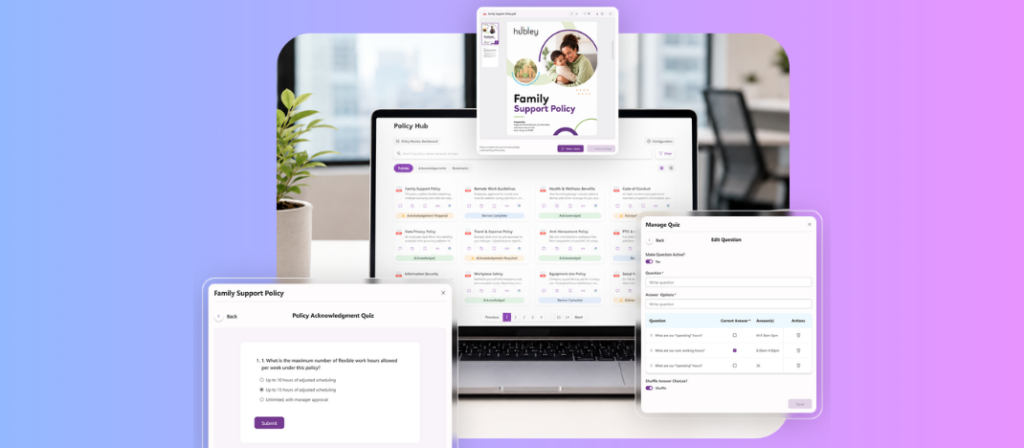
What is Policy Management? Policy management is the process of creating, distributing, tracking, and updating an organization’s rules and procedures so employees can find and follow the current version and help the origanization maintain compliance. hubley’s PolicyHub handles the entire lifecycle inside SharePoint: create, review, approve, publish, confirm, and maintain. For hubley Intelligence customers, PolicyHub also adds AI chat, summarization, auto-generated FAQs, and AI-authored quiz questions. That cuts manual work for policy owners and speeds up answers for employees.
What Is Policy Management?
Policy management is the ongoing process of creating, sharing, enforcing, and updating an organization’s policies and procedures — everything from data security rules to code-of-conduct guidelines. The goal is that every employee knows what is expected of them and can locate the current version of the rule when they need it.
Handled manually, this breaks down quickly. A policy goes out by email, a manager tracks reads in a spreadsheet, and within a quarter nobody can say with certainty who acknowledged the current version. That gap is where compliance risk lives.
Why Does Manual Policy Management Fail?
Organizations still running policies through email and shared drives run into the same problems repeatedly. Multiple copies of the same policy circulate, and employees cannot tell which one is current. There is no reliable audit trail when a regulator asks who signed off on what and when. Departments end up managing their own policy libraries in isolation, so HR, IT, and Legal drift out of sync with each other.
A 2026 buyer’s guide from PowerDMS puts it plainly: the core risk is not a missing document. It is a lack of alignment between an organization’s policies, processes, and procedures.
You’re Already Halfway to a Policy Management System
Most organizations are not starting from zero. Policies get drafted in Word, procedures get built in Excel, and the finished documents land in a SharePoint library — all inside Microsoft 365 already. The real gap is not the tooling to create policies. It is the lifecycle layer on top: routing for approval, tracking who has acknowledged what, and knowing when something needs review.
Buying an entirely separate platform creates its own costs. IT has to stand up a new system. Employees have to learn a new interface. New licenses sit on top of the Microsoft 365 seats already paid for. The policies were already living in SharePoint. Now there is a second home for them somewhere else.
PolicyHub starts from the other direction: the policies are already in SharePoint, so the lifecycle layer goes there too.
What Features Should Policy Management Software Have?
Any serious policy management platform needs a short list of capabilities that go beyond document storage.
| Feature | Why It Matters |
|---|---|
| Centralized, searchable repository | One place to find policies, not scattered files across drives and inboxes |
| Structured approval workflows | Clear owner, reviewer, and approver roles so reviews move forward without chasing people |
| Acknowledgment tracking | Proof that employees received and confirmed a policy |
| Role-based distribution | The right policies reach the right teams without oversharing sensitive content |
| Version control and audit logs | A defensible history of every change for audits and investigations |
| Compliance reporting | A dashboard view of who is compliant and who is not |
| Policy quizzes | Confirmation that employees understood the content, not only that they clicked acknowledge |
PolicyHub delivers these inside a single SharePoint experience rather than as a separate application employees must learn and IT must maintain.
How Does hubley’s PolicyHub Handle the Full Policy Lifecycle?
hubley’s PolicyHub is built directly on Microsoft SharePoint, so policy management lives inside the Microsoft 365 environment employees already use. PolicyHub organizes the lifecycle into six stages:
| Stage | What Happens |
|---|---|
| Create | Upload or compose a policy draft |
| Review | Collect collaborative feedback from reviewers |
| Approve | Route for authorized sign-off |
| Publish | Share with the right audience by role or department |
| Confirm | Track mandatory employee acknowledgment |
| Maintain | Monitor versions and set review dates |
Every role gets its own view. Policy owners create and update policies. Reviewers and approvers collaborate with full context. Employees find, read, acknowledge, and complete required policies. Administrators configure workflows, reports, and system settings. All of this runs from one dashboard that covers policy history, quiz management, and acknowledgment tracking together.
That single dashboard gives complete visibility. Advanced filtering finds policies in seconds. Approvals, acknowledgements, and quiz completion are monitored in real time. Governance workflows can be automated. Compliance reports are generated for audits and leadership reviews.
What’s New: hubley Intelligence Comes to PolicyHub
For hubley Intelligence customers, PolicyHub includes AI capabilities powered by the same intelligence layer behind SearchHub and hubley Agents.
| AI Feature | What It Does |
|---|---|
| Policy Chat | Employees ask a policy question in plain language and receive a direct, permission-aware answer instead of hunting through documents |
| AI Summarization | Long or dense policies receive an automatic plain-language summary |
| AI-Generated FAQs | PolicyHub generates a self-serve FAQ directly from a policy’s content |
| AI-Authored Quiz Questions | hubley Intelligence generates comprehension quiz questions from policy text; owners review and approve rather than writing from scratch |
PolicyHub becomes less of a static repository and more of a policy assistant. It answers employee questions directly and drafts the first version of a quiz so owners are not starting from a blank page.
A Closer Look at Policy Quizzes
Acknowledgment alone only proves an employee clicked a button. It does not prove they understood what they read. Policy Quizzes check for the second part.
Each quiz has a pass threshold set by the policy owner. Score below it, and the employee is routed back to retake the quiz. A policy is not counted as acknowledged until they clear that bar. Quiz format is flexible: multiple choice, true/false, or whatever fits what is being tested.
For hubley Intelligence customers, the AI-generated questions are a starting point. Owners can rewrite a question, swap in a company-specific example, or tighten a weak answer choice before anything goes live. The quiz still reads like someone who knows the policy wrote it, even when AI drafted the first pass.
Results land in the same compliance dashboard as acknowledgment tracking. A policy manager pulling a report sees pass rates, retakes, and comprehension gaps alongside who has acknowledged what, without switching between an acknowledgment log and a separate quiz tool.
PolicyHub vs. PowerDMS, ConvergePoint, and NAVEX PolicyTech
Three names come up most often in independent buyer’s guides for policy management software: PowerDMS, ConvergePoint (now Ideagen Compliance), and NAVEX PolicyTech. Each takes a different architectural approach.
| Platform | Runs Inside Your SharePoint Intranet | Policy Content Stays in Your Microsoft Tenant | Best Suited For |
|---|---|---|---|
| hubley PolicyHub | Yes | Yes | Organizations standardizing on a SharePoint intranet |
| ConvergePoint (Ideagen Compliance) | No — separate application built on SharePoint | Yes | Microsoft 365 organizations wanting a dedicated policy app |
| PowerDMS | No — standalone platform | No | Public safety and healthcare accreditation programs |
| NAVEX PolicyTech | No — standalone SaaS (SharePoint integration via federated search only) | No | Large enterprises with complex GRC and compliance needs |
NAVEX PolicyTech runs as a standalone SaaS platform hosted in NAVEX’s own environment. Policy content lives outside your Microsoft tenant even where SharePoint integration is offered. PowerDMS is also standalone, built for compliance-heavy sectors like law enforcement and healthcare accreditation, with strong training-integration features. ConvergePoint gets closest to PolicyHub’s approach: it is built specifically for Microsoft 365, but it is still layered on top of a SharePoint site as its own separate application.
PolicyHub is not a separate application layered onto SharePoint or hosted outside your tenant. It runs inside the SharePoint intranet your organization is already using with hubley. There is no second system to log into and no policy content leaving your Microsoft 365 environment.
Organizations that need policy management as a fully separate GRC platform, with deep accreditation workflows, may be better served by PowerDMS or NAVEX PolicyTech. PolicyHub is built for organizations that want policy management as part of their SharePoint intranet, not instead of it.
How PolicyHub Supports Smarter Policy Management
Bringing policy creation, approval, AI chat, quizzes, and acknowledgment tracking into one dashboard frees policy managers from chasing sign-offs and writing FAQs by hand. HR and compliance teams get a real-time view of who has acknowledged what. IT and Legal keep sensitive policies scoped to the right audience. New hires get consistent onboarding policy exposure from day one. All of it happens inside the hubley intranet experience employees already use.
PolicyHub supports every role across the organization. Policy owners create and update policies with ease. Reviewers and approvers collaborate, review, and approve with full context. Employees find, read, acknowledge, and complete policies. Administrators configure workflows, reports, and system settings. The result is one centralized SharePoint experience that turns policy management from a scattered, manual process into a controlled, measurable one.
Frequently Asked Questions
What is policy management?
Policy management is the process of creating, distributing, tracking, and updating an organization’s rules and procedures, and confirming employees have read and understood them.
What is policy management software?
A digital system that centralizes the policy lifecycle — creation, review, approval, publication, and acknowledgment tracking — replacing manual processes like email distribution and spreadsheet tracking.
Do we need to buy a separate tool if we already use SharePoint for policies?
Not necessarily. If policies are already stored in SharePoint, PolicyHub adds lifecycle management — approvals, acknowledgment tracking, review reminders — directly on top of that existing library, rather than requiring a new platform.
Is PolicyHub the same as Mitratech’s PolicyHub?
No. hubley’s PolicyHub is a separate, SharePoint-native product built by hubley for Microsoft 365 intranets. Mitratech PolicyHub is a different, unrelated policy management platform.
What’s the difference between PolicyHub and ConvergePoint (Ideagen Compliance)?
Both are built for Microsoft 365 environments, but ConvergePoint runs as its own separate application layered on top of a SharePoint site. PolicyHub runs inside the SharePoint intranet itself, with no second application to license or log into.
What’s the difference between PolicyHub and PowerDMS or NAVEX PolicyTech?
Both PowerDMS and NAVEX PolicyTech are standalone platforms hosted outside a customer’s Microsoft 365 tenant. PolicyHub keeps policy content inside SharePoint and the customer’s own tenant.
Can employees chat with PolicyHub to ask policy questions?
Yes, for hubley Intelligence customers. Employees ask a policy question in plain language and get a direct, permission-aware answer instead of searching through documents manually.
Do policy owners have to write their own quiz questions?
No. For hubley Intelligence customers, PolicyHub’s AI generates quiz questions directly from a policy’s text, and owners review and approve them rather than writing from scratch.
What happens if an employee fails a PolicyHub quiz?
They are routed back to retake it. A policy is not marked acknowledged until they clear the pass threshold the policy owner set.
Can policy owners edit AI-generated quiz questions before publishing?
Yes. hubley Intelligence drafts the questions first, but policy owners can rewrite wording, change the question type, or adjust answer choices before anything goes live.
Is SharePoint alone enough for policy management?
SharePoint provides document storage and collaboration, but it is not purpose-built for policy lifecycle management. Acknowledgment tracking, structured approvals, compliance reporting, and quizzes require a dedicated layer like PolicyHub on top.
See PolicyHub and hubley Intelligence in action
A live demo shows the full lifecycle in one dashboard, including how Policy Chat answers a real employee question and how AI-generated quiz questions look before a policy owner approves them.
Schedule a demo to see PolicyHub running on your own intranet.
Explore more about controls in Azure: https://azure.microsoft.com/en-us/products/azure-policy
Previous blog posts from hubley on Policy Management: https://hubley.com/what-is-policy-management-software/