What happens before a hubley software release reaches your intranet?
Once a new feature, enhancement, or bug fix is ready for review, QA starts testing the change. The check is not limited to the path a demo would take. QA also tests how the feature behaves with different settings, configurations, user actions, and permissions, and how it sits next to the rest of the product.
An intranet is used in more than one way. A communicator publishes news. A manager looks up a policy. An employee opens a personal dashboard. A feature that completes the default action can still fail when permissions differ or when a web part is configured another way. That second case is where many defects show up.
| Question QA asks | What the check covers |
|---|---|
| Does it work? | The intended path. The feature completes the action it was built to complete. |
| What happens if the user does this instead? | Alternate settings, permissions, configurations, and actions that employees and intranet managers actually take. |
How does hubley test a new feature before it ships?
QA treats the change as part of a working intranet, not as an isolated screen. Testing can cover the settings a manager would change, the permission levels employees already have, and the sequences people use to finish a task.
On a hubley intranet, those sequences sit on SharePoint inside your tenant. News, directories, policy pages, onboarding tasks, search, and personal dashboards share the same Microsoft 365 permission model. A release check has to respect that. A feature is not ready because it works for one account with broad access.
| Stage | What QA does | What it protects |
|---|---|---|
| Feature testing | Exercises the new feature, enhancement, or fix across settings, configurations, user actions, and permissions | The change behaves as specified for the people who will use it |
| Regression testing | Checks existing functionality after the change is introduced | Related intranet workflows keep working |
| Accessibility testing | Reviews keyboard navigation, screen reader behavior, focus order, labels, announcements, and alternative text where the feature requires it | Employees can reach, understand, and use the feature |
| Fix and retest | Documents defects, then retests the developer’s fix for the original issue and for side effects | A correction does not trade one problem for another |
| Release validation | Reviews key functionality, included fixes, and important workflows in the release environment | The release as a whole is ready before it reaches clients |
Why does regression testing matter on a SharePoint intranet?
Software is connected. A change in one area can affect another. Regression testing checks existing functionality after a change goes in. Even when a release focuses on one feature, QA verifies that related behavior still matches expectations.
On a hubley intranet, related behavior can include news publishing, search, directories, policy pages, onboarding tasks, and personal dashboards. Repairing one room should not turn off the lights down the hall. Regression testing is that walk through the rest of the house.
That check matters to intranet managers because employees judge the platform by the task they came to finish. A new layout is not useful if publishing a news item, opening a policy, or finding a person now takes a different path than the one the organization trained.
How does hubley check accessibility before a release?
A feature has to be usable by people who interact with software in different ways. Accessibility testing looks for barriers that would make a function hard or impossible to use with assistive technology.
Depending on the feature, QA may check keyboard-only navigation, screen reader behavior, focus order, labels and announcements, and alternative text. The point is not only that the feature runs. Employees need to reach it, understand it, and complete the action.
Those checks sit next to the rest of the release work. An intranet that communications, HR, and IT rely on has to work for the full employee population, including people who do not use a mouse or who use a screen reader.
What happens after Quality Assurance finds a bug?
Finding an issue is not the end of the process. QA documents what a developer needs to investigate: the steps to reproduce the problem, the expected behavior, the actual behavior, and screenshots or other detail when it helps.
After a developer implements a fix, the change comes back to QA. QA tests it again to confirm two things. The original issue is resolved. The fix has not introduced a new problem elsewhere.
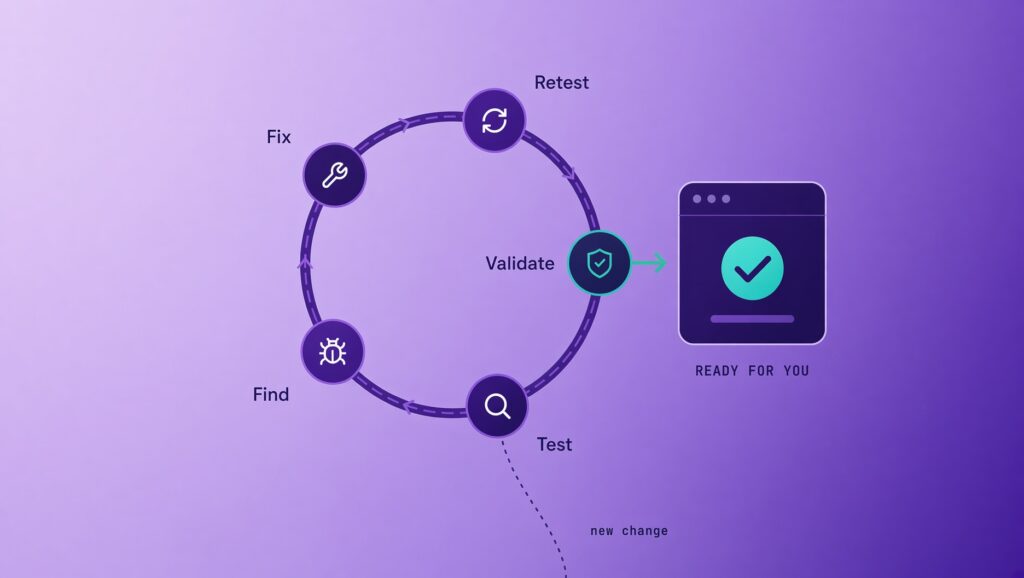
Releases are not always a straight line from development to production. The loop is test, find, fix, retest, validate. It continues until the change is ready. That loop is the reason a release can take more than one pass, and it is also the reason a known defect is not left for your intranet managers to discover.
| Step | Who acts | What happens |
|---|---|---|
| Test | Quality Assurance | Exercises the change across settings, permissions, and related scenarios |
| Find | Quality Assurance | Records the issue with reproduction steps, expected result, and actual result |
| Fix | Development | Implements a correction |
| Retest | Quality Assurance | Confirms the original issue is gone and checks for side effects |
| Validate | Quality Assurance | Reviews the release as a whole before it is offered to clients |
What does final release validation cover?
Before a release reaches users, QA runs another round of validation. The focus moves from individual changes to the release as a whole. QA reviews key functionality, verifies the fixes included in the release, and checks important workflows in the release environment.
That pass is one more checkpoint between development and delivery. It is the last structured look at the release before clients see it on the intranet.
What should intranet managers expect when an update arrives?
By the time you see a new feature or improvement, it may already have been through several rounds of testing, bug fixes, accessibility checks, regression testing, and release validation. Much of that work stays out of sight. A successful release should not ask you to think about the testing. It should feel reliable and ready to use.
Your pages, files, and permission model remain in your Microsoft 365 tenant. If a release note describes a setting or a behavior change, your hubley team can walk through what it means for the way your organization publishes and finds content.
If something in your tenant does not match the release notes, your hubley team and Customer Success Manager are the path for that report. Product ideas about hubley features can go through Knowledge and Feedback on the web part. Questions about your content, your design, or a workflow in your tenant belong with your hubley team.
Ask your Customer Success Manager which changes are in the current hubley GREEN release, or request a walkthrough of the platform on your Microsoft 365 tenant.
Frequently asked questions
What happens before a hubley release reaches our intranet?
hubley Quality Assurance tests the change, checks that related features still behave as expected, reviews accessibility where the feature requires it, documents and retests any issues, and validates the release as a whole before it is ready for clients.
Does hubley only test the new feature in a release?
No. QA tests the new feature, enhancement, or fix, then runs regression testing on related functionality. A change in one area of the intranet can affect another, so existing workflows are checked after the change is introduced.
How does hubley handle a bug found during testing?
QA documents the steps to reproduce the issue, the expected behavior, the actual behavior, and screenshots or other detail a developer needs. After development implements a fix, QA tests it again to confirm the original issue is resolved and that the fix has not introduced a new problem.
Does hubley test accessibility before a release?
Yes. Depending on the feature, accessibility testing can include keyboard-only navigation, screen reader behavior, focus order, labels and announcements, and alternative text. The check is whether employees can reach, understand, and use the feature, not only whether it runs.
Will a hubley release change our permissions or content?
A product release is tested against permissions, settings, and configurations so the feature behaves correctly for different users. Your organization’s pages, files, and permission model stay in your Microsoft 365 tenant. If a release note describes a setting change, your hubley team can walk through what it means for your intranet.
How often does hubley release new features?
Clients on hubley GREEN receive new features and modules on a quarterly cadence, along with design refreshes. Each release still goes through testing, regression checks, accessibility review where it applies, and release validation before it is ready.
Who should we contact if something looks off after a release?
Contact your hubley team or Customer Success Manager. Product ideas about hubley features can go through Knowledge and Feedback on the web part. Questions about your tenant, content, or a specific workflow belong with your hubley team.